
Material Providers
Determines which Material to use where.
Constant
Provides a constant Material.
Parameters:
| Name | Type | Description |
|---|---|---|
| Material | Material slot |
Solidity
Separates terrain into Solid and Empty blocks. Provides a Material Provider slot for each selection.
Parameters:
| Name | Type | Description |
|---|---|---|
| Solid | Material Provider slot | |
| Empty | Material Provider slot |
Queue
Goes through a queue of Material Provider slots from highest to lowest priority. If a Material Provider in the queue doesn’t provide a block type, then the next one in the queue is queried. If no slot provides a block, then the Queue Material Provider will not provide a block. The query stops at the first slot that provides a block.
Parameters:
| Name | Type | Description |
|---|---|---|
| Queue | list of Material Provider slots | Slots are queried from top to bottom. |
SimpleHorizontal
Applies the child Material Provider to a vertical range.
If a BaseHeight is provided, the TopY and BottomY values are relative to the referenced DecimalConstant. Otherwise, they’re relative to the world’s Y coordinate.
Parameters:
| Name | Type | Description |
|---|---|---|
| TopY | integer | Y coordinate. Defines the vertical top exclusive limit of the region. |
| Top BaseHeight | string | DecimalConstant name. |
| BottomY | integer | Y coordinate. Defines the vertical bottom inclusive limit of the region. |
| Bottom BaseHeight | string | DecimalConstant name. |
| Material | Material Provider slot | Slot to query for the selected region. |
Striped
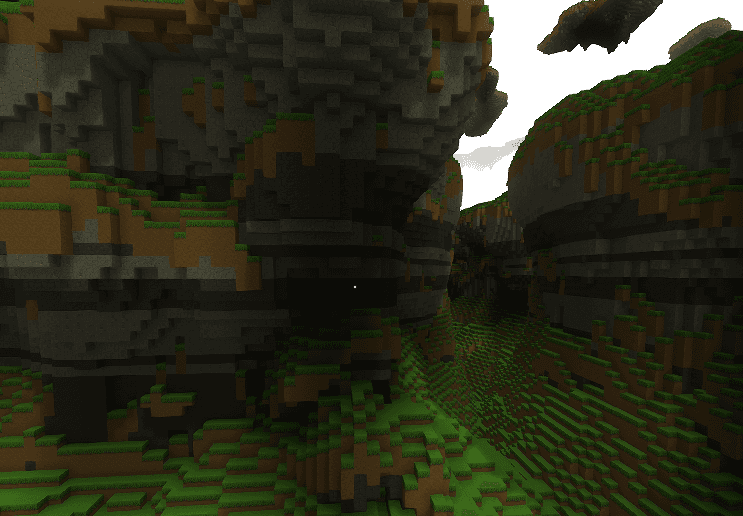
Applies a Material Provider slot to a set of horizontal stripes of blocks of varying thickness and position. Below is an example of basalt stripes in a stone cliff.
Parameters:
| Name | Type | Description |
|---|---|---|
| Stripes | list of stripe assets | Each stripe contains |
| Stripes[].TopY | integer | World Y value. Inclusive. |
| Stripes[].BottomY | integer | World Y value. Inclusive. |
| Material | Material Provider slot | Slot to query for the selected region. |
Weighted
Picks the Material Provider slot to query from a list. Each slot has a weight that determines the likelihood of being picked.
Parameters:
| Name | Type | Description |
|---|---|---|
| Seed | string | |
| SkipChance | float (0.0–1.0) | Percentage of blocks to skip. When skipped, this provider returns no block and does not pick a slot. |
| WeightedMaterials | list of weighted Material Provider slots | |
| WeightedMaterials[].Weight | number (> 0) | Higher value increases likelihood of being picked. |
| WeightedMaterials[].Material | Material Provider slot |
FieldFunction
Selects a 3D region using a noise function and value delimiters. The delimiters link a Material Provider slot to a specific range of values in the noise function.
Parameters:
| Name | Type | Description |
|---|---|---|
| FieldFunction | field function asset | Defines the field value for each block. Same asset type used by DAOTerrain density. |
| Delimiters | list of delimiters | Higher entries have higher priority. |
| Delimiters[].From | float | Minimum limit of the delimiter’s range. |
| Delimiters[].To | float | Maximum limit of the delimiter’s range. |
| Delimiters[].Material | Material Provider slot | Slot linked to this delimiter. |
SpaceAndDepth
Allows placing layers of blocks on a terrain’s floor or ceiling surfaces. Layers of Material are piled on top of each other inside the surface (floor or ceiling), like a cake. There are multiple Layer types, each providing a unique way to define thickness. Below is an example with two layers in the floor of our terrain.
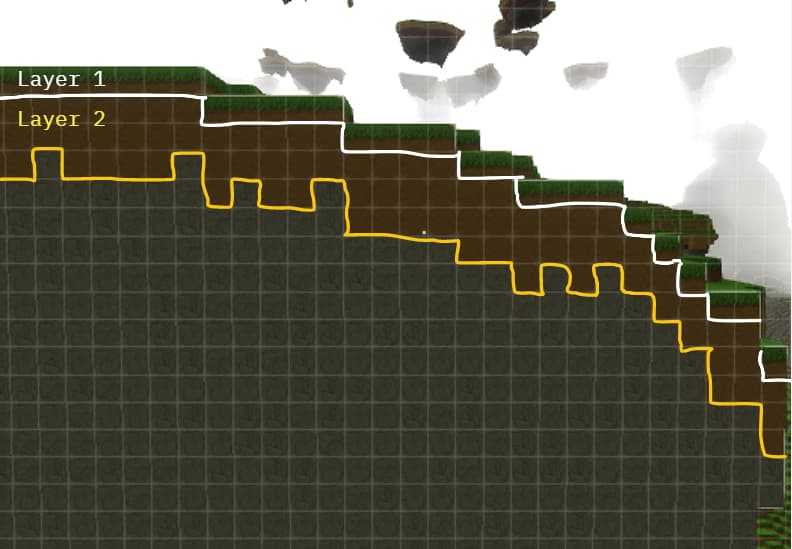
Conditions let you skip this Material Provider when they’re not met. An example could be a Condition that only places grass if there are at least 5 empty blocks above the surface.
Parameters:
| Name | Type | Description |
|---|---|---|
| LayerContext | string | Context the layers are applied on. Values: |
| MaxExpectedDepth | positive integer | Optimization hint. Set to max expected combined layer depth. Too small can cut off layers. Too large can hurt performance. |
| Condition | Condition slot | Provider returns no block if the Condition fails. |
| Layers | list of Layer objects | Stacked top-to-bottom as depth increases into the context. |
Condition
A Condition object checks whether the environment is valid to determine whether the Material Provider should run for the current block. If the Condition fails for a block, the Material Provider returns no block.
An example Condition could check if there are at least 5 blocks of empty space above the floor. This is useful if you want dirt in tight spaces instead of grass. An example is shown below.
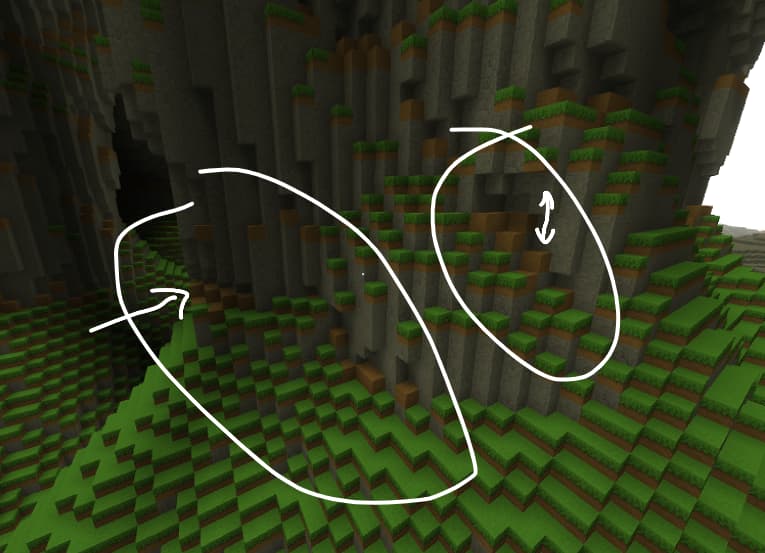
See the JSON code here.
The Condition’s ContextToCheck parameter selects which context value the Condition queries. In the example above, we’re checking the SPACE_ABOVE_FLOOR context, which is the number of blocks above the floor. There are currently two possible context values you can use:
SPACE_ABOVE_FLOORSPACE_BELOW_CEILING
There are multiple Condition types that allow you to compose more complex Conditions from simpler ones. Below are the different types.
EqualsCondition
Validates only if a context value is equal to the Condition’s configured value.
Parameters:
| Name | Type | Description |
|---|---|---|
| ContextToCheck | string ( | Which context value the Condition queries. |
| Value | integer | Condition passes only if the context value equals this. |
GreaterThanCondition
Validates only if a context value is greater than the Condition’s configured threshold.
Parameters:
| Name | Type | Description |
|---|---|---|
| ContextToCheck | string ( | Which context value the Condition queries. |
| Threshold | integer | Condition passes only if the context value is greater than this. |
SmallerThanCondition
Validates only if a context value is smaller than the Condition’s configured threshold.
Parameters:
| Name | Type | Description |
|---|---|---|
| ContextToCheck | string ( | Which context value the Condition queries. |
| Threshold | integer | Condition passes only if the context value is smaller than this. |
AndCondition
Logical AND Condition. Validates only if all child Conditions validate.
Parameters:
| Name | Type | Description |
|---|---|---|
| Conditions | list of Condition slots | Condition passes only if all child Conditions pass. |
OrCondition
Logical OR Condition. Validates if any child Condition validates.
Parameters:
| Name | Type | Description |
|---|---|---|
| Conditions | list of Condition slots | Condition passes if any child Condition passes. |
NotCondition
Logical NOT Condition. Validates only if its child Condition does not validate.
Parameters:
| Name | Type | Description |
|---|---|---|
| Condition | Condition slot | Single slot (not a list). Condition passes if the child Condition fails. |
AlwaysTrueCondition
This Condition type always validates.
Layer
In the SpaceAndDepth Material Provider type, Layers are stacked into the depth of the floor or ceiling. Layers have a thickness and a Material Provider.
Below are some examples that illustrate how layers work.
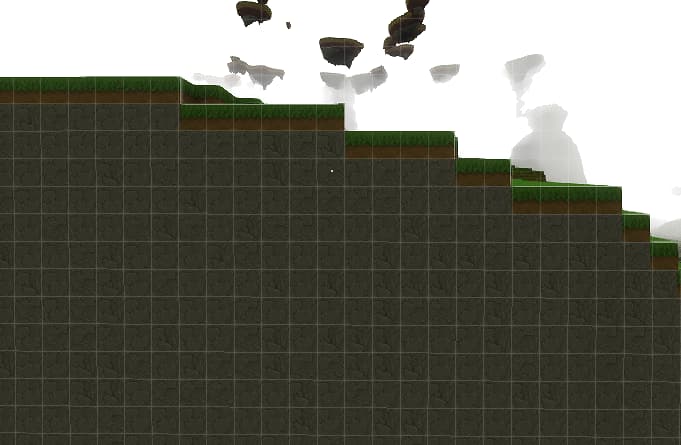
Example 1:
- Layer 1: grass of thickness 1.
Example 2:
- Layer 1: grass of thickness 1.
- Layer 2: dirt of thickness ranging from 2 to 3.
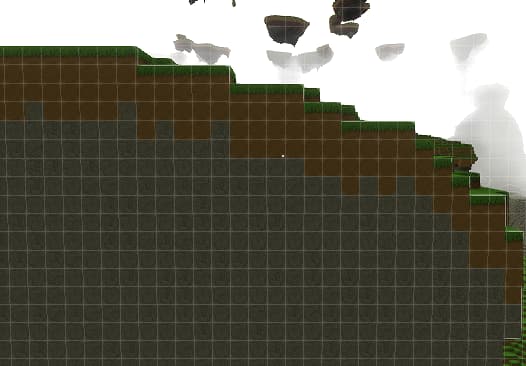
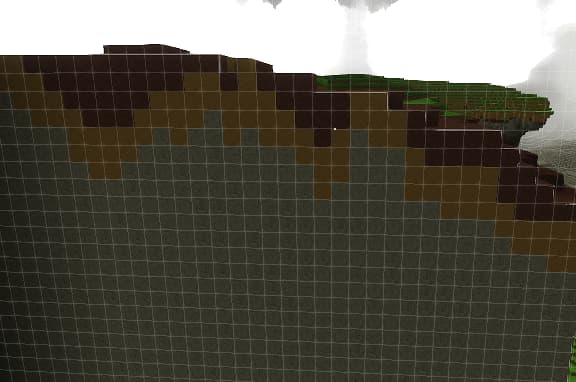
Example 3:
- Layer 1: mud of thickness 1 to 5 defined by a 2D simplex noise function.
- Layer 2: dirt of thickness ranging from 2 to 3.
Example 4: This example shows how this can work not only on floors but also on ceilings by changing the LayerContext value to DEPTH_INTO_CEILING.
- Layer 1: dirt of thickness in range 2 to 3.
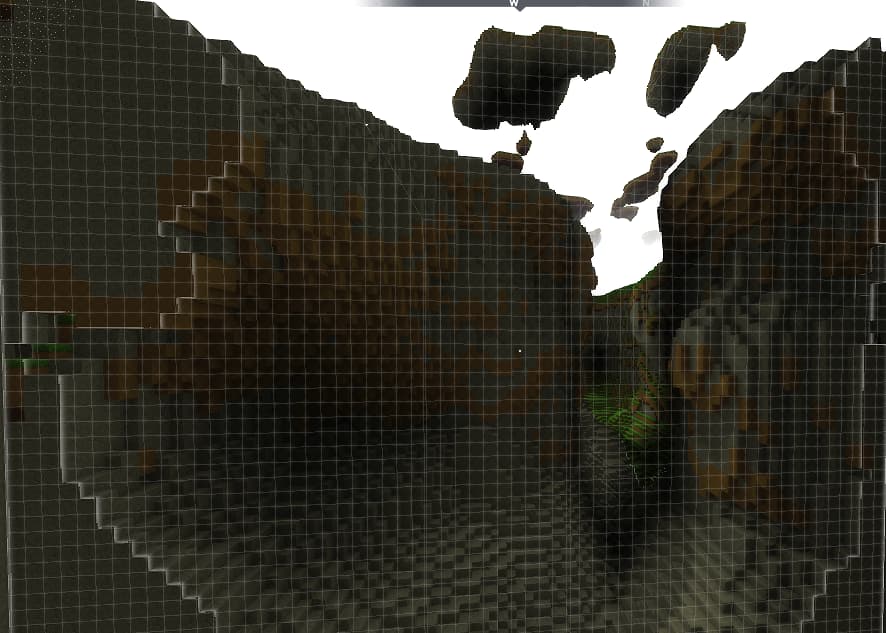
End of examples.
Below are the supported Layer types.
ConstantThickness
Has the same thickness everywhere.
Parameters:
| Name | Type | Description |
|---|---|---|
| Material | Material Provider slot | |
| Thickness | integer (>= 0) | Thickness in blocks. |
RangeThickness
The thickness varies per XZ coordinate and is defined by a range of possible values.
Parameters:
| Name | Type | Description |
|---|---|---|
| Material | Material Provider slot | |
| RangeMin | integer (>= 0) | Minimum thickness in blocks. |
| RangeMax | integer (>= 0) | Maximum thickness in blocks (inclusive). |
| Seed | string |
WeightedThickness
The thickness varies per XZ coordinate and is picked from a list of weighted thickness values.
Parameters:
| Name | Type | Description |
|---|---|---|
| Material | Material Provider slot | |
| PossibleThicknesses | list of weighted thickness values | Used to pick a thickness per XZ. |
| Seed | string | Seed used when picking the thickness. |
NoiseThickness
The thickness varies per XZ coordinate and is determined by a noise function tree. The thickness value comes from the function output. In the example below, the output is normalized from 0 to 5. This makes the thickest points about 5 blocks.
Parameters:
| Name | Type | Description |
|---|---|---|
| Material | Material Provider slot | |
| ThicknessFunctionXZ | noise function tree | Sampled as a 2D function on the XZ plane (Y is always |
Imported
Imports an exported Material Provider.
Parameters:
| Name | Type | Description |
|---|---|---|
| Name | string | The exported Material Provider. |