
Curves
Curves map decimal values to other decimal values. They enable the basic f(x) = y math expression. These nodes can be used to build the functions you need in world-gen.
Manual
You can plot points that connect with lines to create the curve. The points are connected with straight lines. The function is constant before the first point and after the last point.
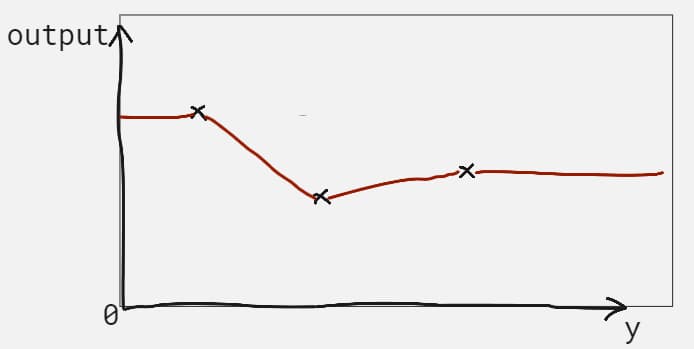
The example above shows a function made of 3 points.
DistanceExponential
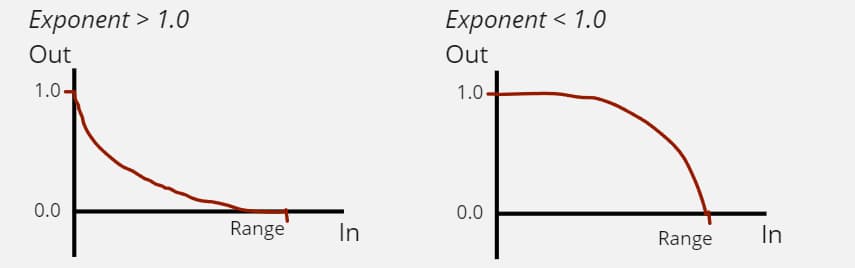
The DistanceExponential Curve has the following shape depending on the Exponent value. As this curve’s input approaches the Range value, it outputs 0.0. At an input of 0.0, this curve outputs 1.0.
Parameters:
| Name | Type | Description |
|---|---|---|
| Exponent | positive decimal number | Affects the curve’s shape like in the diagram above. |
| Range | positive decimal number | The value after which the curve outputs a constant 0.0. |
DistanceS
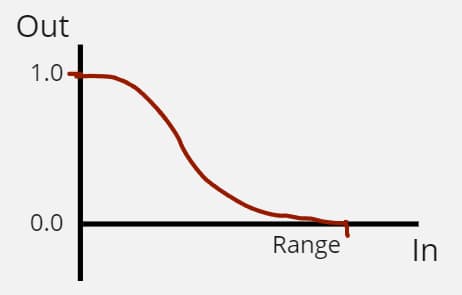
The DistanceS Curve combines two DistanceExponential curves to produce a shape similar to the diagram below. As this curve’s input approaches the Range value, it outputs 0.0. At an input of 0.0, this curve outputs 1.0. The asset’s parameters allow you to tweak the shape of the curve.
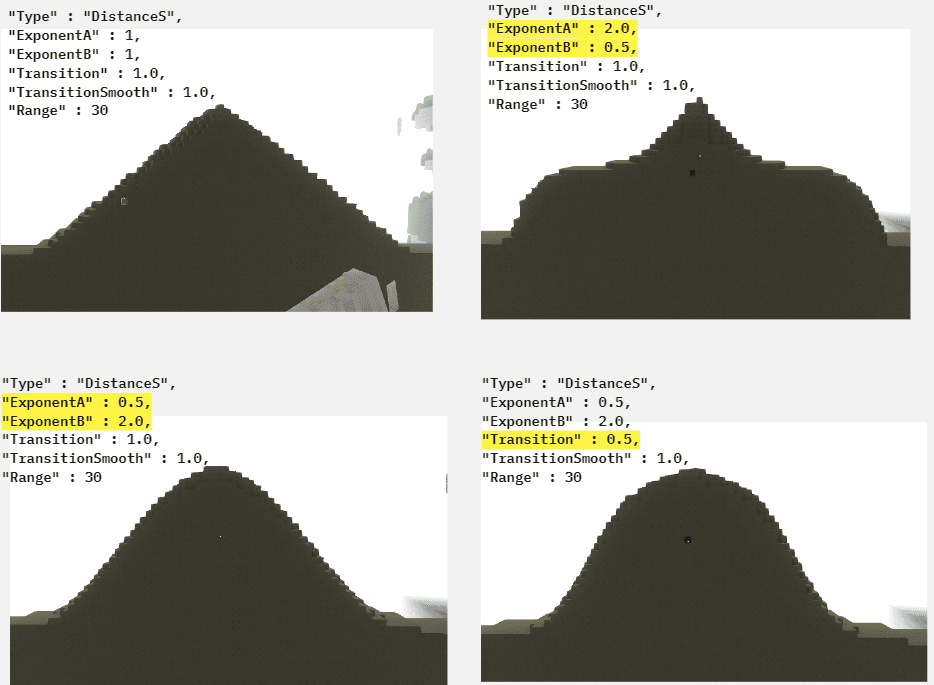
Below are some examples of Positions2D terrain using this curve.
Parameters:
| Name | Type | Description |
|---|---|---|
| ExponentA | decimal value greater than 0.0 | Affects the curve’s shape in the first half of the range. |
| ExponentB | decimal value greater than 0.0 | Affects the curve’s shape in the second half of the range. |
| Range | decimal value greater than 0.0 | The value after which the curve outputs a constant 0.0. |
| Transition | optional decimal value between 0.0 and 1.0 with a default of 1.0 | Values close to 0.0 create a curve with a faster, more sudden transition between ExponentA and ExponentB. Values of 1.0 transition from ExponentA to ExponentB over the entire curve. |
| TransitionSmooth | optional decimal value between 0.0 and 1.0 with a default of 1.0 | Affects the shape of the transition. Lower values can result in a sharper curve in some situations. Try different values while you design to get a feel for it. |
Ceiling
This curve puts a ceiling on the output of the child curve asset.
Parameters:
| Name | Type | Description |
|---|---|---|
| Ceiling | decimal number | The maximum value this curve will output. |
| Curve | curve slot |
Floor
This curve puts a floor on the output of the child curve asset.
Parameters:
| Name | Type | Description |
|---|---|---|
| Floor | decimal number | The minimum value this curve will output. |
| Curve | curve slot |
SmoothCeiling
This curve puts a ceiling on the output of the child curve asset. As the curve approaches the ceiling within the provided range, it gets smoothed.
Parameters:
| Name | Type | Description |
|---|---|---|
| Ceiling | decimal number | The maximum value this curve will output. |
| Range | decimal number, greater or equal to 0 | The range determines how much smoothing is applied. A good starting value would be ¼ of the known range of your child curve. |
| Curve | curve slot |
| Name | Type | Description |
|---|---|---|
| Ceiling | decimal number | The maximum value this curve will output. |
| Range | decimal number, greater than or equal to 0 | The range determines how much smoothing is applied. A good starting value would be ¼ of the known range of your child curve. |
| Curve | curve slot |
SmoothFloor
This curve puts a floor on the output of the child curve asset. As the curve approaches the floor within the provided range, it gets smoothed.
Parameters:
| Name | Type | Description |
|---|---|---|
| Floor | decimal number | The minimum value this curve will output. |
| Range | decimal number, greater or equal to 0 | The range determines how much smoothing is applied. A good starting value would be ¼ of the known range of your child curve. |
| Curve | curve slot |
| Name | Type | Description |
|---|---|---|
| Floor | decimal number | The minimum value this curve will output. |
| Range | decimal number, greater than or equal to 0 | The range determines how much smoothing is applied. A good starting value would be ¼ of the known range of your child curve. |
| Curve | curve slot |
SmoothClamp
This curve limits the range of the child curve asset within the provided walls. As the curve approaches the limits within the provided range, it gets smoothed.
Parameters:
| Name | Type | Description |
|---|---|---|
| WallA | decimal number | |
| WallB | decimal number | |
| Range | decimal number, greater or equal to 0 | The range determines how much smoothing is applied. A good starting value would be ¼ of the known range of your child curve. |
| Curve | curve slot |
| Name | Type | Description |
|---|---|---|
| WallA | decimal number | |
| WallB | decimal number | |
| Range | decimal number, greater than or equal to 0 | The range determines how much smoothing is applied. A good starting value would be ¼ of the known range of your child curve. |
| Curve | curve slot |
SmoothMax
This curve retrieves the maximum between the two curves provided. The intersection between the curves is smoothed as their values approach within the provided range.
Parameters:
| Name | Type | Description |
|---|---|---|
| Range | decimal number, greater than or equal to 0 | The range determines how much smoothing is applied. A good starting value would be ¼ of the known range of your child curves. |
| CurveA | curve slot | |
| CurveB | curve slot |
SmoothMin
This curve retrieves the minimum between the two curves provided. The intersection between the curves is smoothed as their values approach within the provided range.
Parameters:
| Name | Type | Description |
|---|---|---|
| Range | decimal number, greater than or equal to 0 | The range determines how much smoothing is applied. A good starting value would be ¼ of the known range of your child curves. |
| CurveA | curve slot | |
| CurveB | curve slot |
Clamp
This clamps the curve between the two wall values provided. The output of this curve will never reach outside the walls.
Parameters:
| Name | Type | Description |
|---|---|---|
| WallA | decimal number | |
| WallB | decimal number | |
| Curve | curve slot |
Inverter
This inverts the child curve such that positive values become negative and negative values become positive.
Parameters:
| Name | Type | Description |
|---|---|---|
| Curve | curve slot |
Max
This outputs the maximum value of all the child curves.
Parameters:
| Name | Type | Description |
|---|---|---|
| Curves | list of curve slots |
Min
This outputs the minimum value of all the child curves.
Parameters:
| Name | Type | Description |
|---|---|---|
| Curves | list of curve slots |
Multiplier
This multiplies all the child curves’ outputs.
Parameters:
| Name | Type | Description |
|---|---|---|
| Curves | list of curve slots |
Not
This applies a logical NOT operation on the child curve. When the child’s output is 1, this will output 0, and when the child’s output is 0, this will output 1. All numbers in between are scaled accordingly.
Parameters:
| Name | Type | Description |
|---|---|---|
| Curve | curve slot |
Sum
This adds the values of all the provided curves.
Parameters:
| Name | Type | Description |
|---|---|---|
| Curves | list of curve slots |
Imported
Imports an exported Curve.
Parameters:
| Name | Type | Description |
|---|---|---|
| Name | string | The exported Curve asset. |