
Interactable NPCs
Bringing NPCs to Life: How Custom NPC Interactions Work in Hytale.
This guide breaks down how interactive NPCs work in Hytale using the vanilla Kweebec Merchant as a reference. By the end, you'll understand the Interactions section of a role JSON and be able to create your own interactive NPC.
Note: It’s recommended you either start with or also read the NPC Documentation series, which covers behavior trees, sensors, actions, and states for combat NPCs. This is a thorough foundational piece and helpful in learning the flow of NPCRole JSONs
Section 1: Properties Overview
The top-level fields define what the NPC is.
| Field | Value | Purpose |
|---|---|---|
Type | Generic | Self-contained role, no template inheritance |
Appearance | Kweebec_Rootling | The NPC model |
MaxHealth | 50 | Health pool |
DefaultPlayerAttitude | Neutral | Doesn't attack players |
DefaultNPCAttitude | Ignore | Doesn't react to other NPCs |
Invulnerable | true | Can't take damage |
StartState | Idle | Initial behavior state |
BusyStates | ["$Interaction"] | While in this state, other players can't interact (the NPC is "busy") |
MotionControllerList | Walk controller | How the NPC moves physically |
These are just the properties this merchant uses. For the full list of every available role property, see the NPC Meta Reference https://hytalemodding.dev/en/docs/official-documentation/npc-doc
BusyStatesis worth a sidebar: when the NPC enters$Interaction, the engine marks it as busy. Any other player pressing F gets rejected at the packet level (willInteractWith()returns false). Rmove$Interactionfrom BusyStates if you want to allow multiple players to open the shop simultaneously (each gets their own shop window as it's per-player).
Section 2: Instructions (Main Behavior) Flow
The Instructions array is the main behavior tree. It runs every tick and controls what the NPC does on its own. This merchant has three states, let’s learn them:
Idle
{
  "Sensor": { "Type": "State", "State": "Idle" },
  "Instructions": [
    {
      "ActionsBlocking": true,
      "Sensor": { "Type": "Player", "Range": 8 },
      "Actions": [
        { "Type": "PlayAnimation", "Slot": "Status", "Animation": "Wave" },
        { "Type": "State", "State": "Watching" }
      ]
    },
    {
      "Sensor": { "Type": "Any" },
      "BodyMotion": { "Type": "Nothing" }
    }
  ]
}
This Idle block is a top level Instruction with two nested instructions within in. Think of this like a nested If statement.
If the State is Idle, proceed into one of these two instructions:
- If a player is within 8 blocks then play the Wave animation, then transition to Watching.
ActionsBlockingmeans the animation finishes before the state changes. - If no player within 8 blocks, then stand still.
The Any Sensor is always true, but the order of these matters. The first nested instruction gets priority, so if a player is within 8 blocks it runs and Any, despite being true, does not.
Both of these are running at every tick. So on server start the NPC will begin in Idle. Once a player enters it’s radius and triggers the Watching State, we move to the next state below.
Watching
{
  "Sensor": { "Type": "State", "State": "Watching" },
  "Instructions": [
    {
      "Continue": true,
      "Sensor": { "Type": "Player", "Range": 12 },
      "HeadMotion": { "Type": "Watch" }
    },
    {
      "Continue": true,
      "Sensor": { "Type": "Any" },
      "Actions": [
        {
          "Type": "Timeout", "Delay": [2, 2],
          "Action": { "Type": "PlayAnimation", "Slot": "Status" }
        }
      ]
    },
    {
      "Sensor": { "Type": "Not", "Sensor": { "Type": "Player", "Range": 12 } },
      "Actions": [
        { "Type": "PlayAnimation", "Slot": "Status" },
        { "Type": "State", "State": "Idle" }
      ]
    },
    {
      "Sensor": { "Type": "Any" },
      "BodyMotion": { "Type": "Nothing" }
    }
  ]
}
Now in the Watching state we have four nested instructions. The first two have Continue set, so they run together in the same tick:
- If a player is within 12 blocks, then track them with head motion. Continue
- Always (Any) wait 2 seconds and then clear the wave animation. Continue
- If NO player is within 12 blocks then clear animation, return to Idle. (This only runs if instruction 1 didn't match)
- Fallback Any (so any other situation) return to Nothing
$Interaction
{
  "Sensor": { "Type": "State", "State": "$Interaction" },
  "Instructions": [
    {
      "Continue": true,
      "Sensor": { "Type": "Target", "Range": 10 },
      "HeadMotion": { "Type": "Watch" }
    },
    {
      "Sensor": { "Type": "Any" },
      "Actions": [
        {
          "Type": "Timeout", "Delay": [1, 1],
          "Action": {
            "Type": "Sequence",
            "Actions": [
              { "Type": "ReleaseTarget" },
              { "Type": "State", "State": "Watching" }
            ]
          }
        }
      ]
    }
  ]
}
The NPC enters it’s 3rd state when a player interacts. Two nested instructions:
- If the locked-on player is within 10 blocks then watch them with head motion. Continue.
- Always (Any) wait 1 second then release the target and return to Watching
The 1-second delay prevents the NPC from snapping back to idle the instant the player closes the shop.
Section 3: InteractionInstruction
The InteractionInstruction is a separate behavior tree from Instructions. It runs once per nearby player (within 10 blocks), every tick, and controls the F-key prompt and what happens when the player presses it.
Let’s go through these 3 Instructions now:
Instruction 1: Hide the prompt if the player isn't facing the NPC
{
  "Sensor": {
    "Type": "Not",
    "Sensor": { "Type": "CanInteract", "ViewSector": 180 }
  },
  "Actions": [
    { "Type": "SetInteractable", "Interactable": false }
  ]
}
CanInteract checks if the player is within the NPC's 180-degree view sector. The Not inverts it: if the player is behind the NPC, hide the F prompt.
Instruction 2: Show the prompt
{
  "Continue": true,
  "Sensor": { "Type": "Any" },
  "Actions": [
    {
      "Type": "SetInteractable",
      "Interactable": true,
      "Hint": "server.interactionHints.trade"
    }
  ]
}
If we got past instruction 1 (the player IS facing the NPC), show the F prompt with the "trade" hint text. Continue is set so instruction 3 also gets evaluated this tick.
Instruction 3: Handle the F-key press
{
  "Sensor": { "Type": "HasInteracted" },
  "Instructions": [
    {
      "Sensor": {
        "Type": "Not",
        "Sensor": { "Type": "State", "State": "$Interaction" }
      },
      "Actions": [
        { "Type": "LockOnInteractionTarget" },
        { "Type": "OpenBarterShop", "Shop": "Kweebec_Merchant" },
        { "Type": "State", "State": "$Interaction" }
      ]
    }
  ]
}
HasInteracted fires once when the player presses F (it consumes the input). Inside, there's a check: if the NPC is NOT already in $Interaction state, fire three actions:
LockOnInteractionTarget- store this player as the NPC's target for head trackingOpenBarterShop- open the shop UI for this player (per-player, not shared)State: $Interaction- transition the NPC into the interaction state
The Not(State: $Interaction) check works with BusyStates to prevent re-interaction. BusyStates blocks new F-key presses at the engine level; this check is a safety net within the behavior tree itself. So if you want multiple users to have access at the same time, avoid both.
How the Two Trees Connect
The Instructions tree and InteractionInstruction tree work together through the $Interaction state:
- Player approaches, Instructions tree triggers: NPC wave animation, transitions to Watching
- Every tick, InteractionInstruction tree: shows the F prompt if the player is facing the NPC
- Player presses F, InteractionInstruction tree:
HasInteractedfires, locks target, opens shop, sets $Interaction - Instructions tree sees $Interaction: watches the player, starts a 1-second timeout
- Timeout expires, Instructions tree: releases target, returns to Watching
Section 4: Make Your Own
Changing the Interaction
To create your own interactive NPC, copy the Kweebec Merchant JSON into your asset pack at Server/NPC/Roles/ and change what happens when the player presses F. You can customize any step, ie add a “Hello!” voice line when they wave too.
The action that fires for F interact is in InteractionInstruction, instruction 3. Replace OpenBarterShop with any other interaction action.
Open a different shop:
{ "Type": "OpenBarterShop", "Shop": "Your_Shop_Id" }Use a custom action registered by a plugin:
{ "Type": "YourCustomAction", "YourField": "your_value" }Custom Actions
Custom actions are registered with NPCPlugin.get().registerCoreComponentType() : the same API that OpenBarterShop itself uses. Your plugin can register actions the same way.
InteractionInstruction is an extension point. The action that fires when a player presses F doesn't have to be a shop, it can be anything.
OpenBarterShop registers using one line:
NPCPlugin.get().registerCoreComponentType("OpenBarterShop",BuilderActionOpenBarterShop::new);
So all you have to do is extend that same API.

To show what that looks like in practice, here’s a custom Kweebec Merchant who opens to a dialog box with 2 buttons: Browse Wares and Goodbye. This is a small Java plugin and one .ui layout file, using the exact same InteractionInstruction pipeline from this guide.
Snippet from the plugin
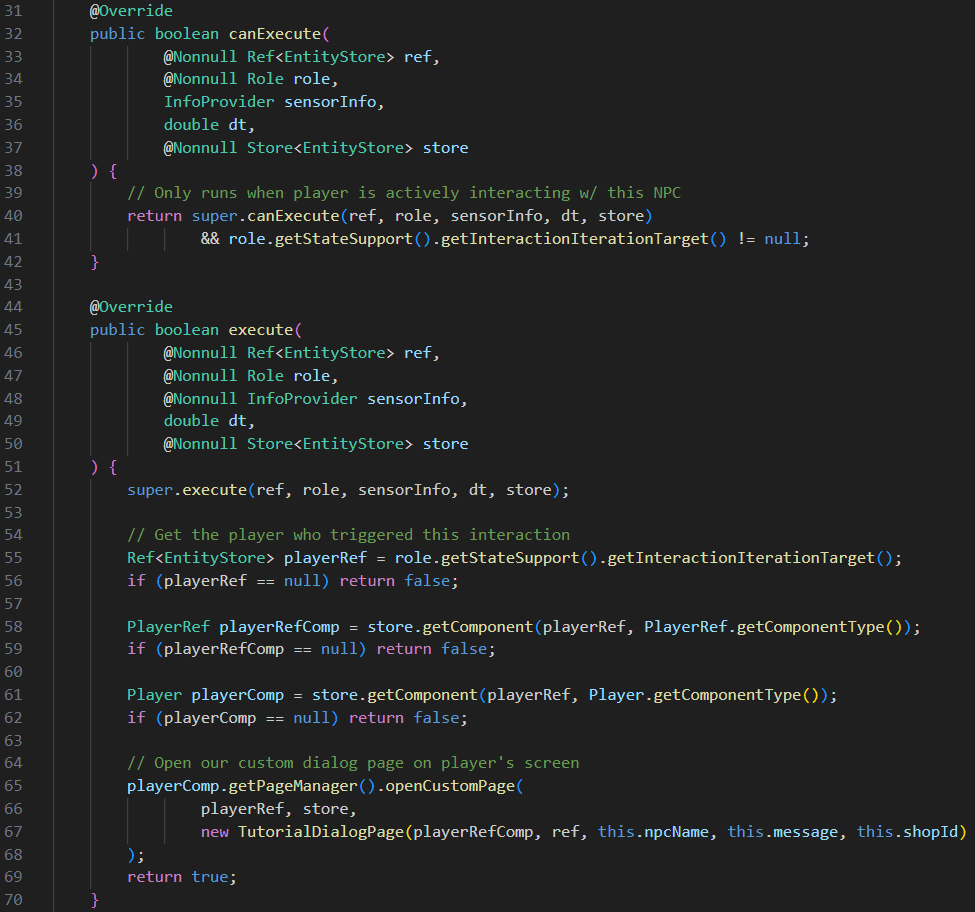
Using the same logic, you could easily add an entire dialog tree, quest givers, and more. And that’s just when you stick to having it open a page. When combined with custom plugins, F interact can trigger anything you create.
Challenge: Make a Treasure Goblin who drops a loot chest when F interact is triggered. Here are 2 guides that can help you get started
- NPC Tutorial: Melee Combat - https://hytalemodding.dev/en/docs/official-documentation/npc/11-melee-combat
- NPC Meta Reference: https://hytalemodding.dev/en/docs/official-documentation/npc-doc
Hint 1: The Rabbit flees from the player and registers F interact without the 180 degree cone Hint 2: The Goblin_Thief flees from the player and drops a chest on death